Level Up Your POD Designs with a Powerful Illustrator Template
You've got the vision. Maybe it's a retro-inspired t-shirt line that channels 70s garage band vibes, or a series of KDP interiors that need consistent, professional layouts. The ideas are there, but staring at a blank artboard in Illustrator can feel paralyzing. How do you translate that creative spark into polished, market-ready designs without spending hours setting up files, hunting for fonts, and building graphic elements from scratch? That's precisely the gap a well-crafted Print on Demand Illustrator Template is designed to close, acting as your creative launchpad rather than a restrictive mold.
Beyond a Blank Canvas: What's Actually Inside?
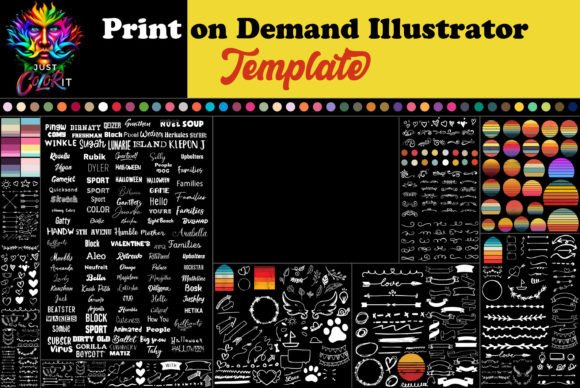
Think of a premium design asset like this not as a finished product, but as a curated workshop. The core is a fully editable Adobe Illustrator (.ai) file, which is the industry standard for vector-based design. This means every element is scalable—you can resize a graphic for a tiny sticker or a massive poster without losing quality. But the real value lies in what's pre-loaded. We're talking about a library of over 160 fonts included directly in the package, eliminating the frantic search for the perfect typeface. You'll find a versatile collection of graphic elements: arrows, circles, stars, borders, and a standout groovy retro circle design that provides instant vintage flair. The color palette is pre-selected to be visually cohesive, giving you a professional starting point that you can adjust to fit any brand's guidelines.
This kind of comprehensive kit is a game-changer for visual consistency. When you use the same foundational assets across your product line—say, the same set of arrows for callouts and the same script font for headlines—you build a recognizable brand identity. Customers start to associate that particular visual language with your store, which is a cornerstone of brand recognition. For a small business owner or a content creator juggling multiple projects, this consistency isn't just aesthetically pleasing; it's a time-saving strategy that makes your entire operation look more professional.
Practical Applications: From T-Shirts to Total Branding
The versatility of an Illustrator template extends far beyond printing a single design on a mug. Let's break down where this asset truly shines.
For Merchandise & Product Design: This is the bread and butter. Use the template to rapidly prototype t-shirt designs, tote bag graphics, and poster art. The pre-made retro circle element is perfect for creating logos or central motifs for a vintage clothing line. The vast font library allows you to mix and match a bold display font for a headline with a clean sans-serif for supporting text, ensuring readability on physical products.
For Digital Products & KDP: If you're creating low-content books like journals, planners, or coloring books, the template provides a consistent framework. Design cohesive covers, interior page elements, and chapter headings using the same font set and graphic style. This professional presentation can significantly improve the perceived value of your digital products on platforms like Amazon KDP.
For Marketing & Social Media: Need to create a quick Instagram post or a Facebook ad? Open the template, swap out a few elements, and you have a branded graphic that matches your product listings. Use the graphic goodies to create eye-catching story highlights, sale announcements, or tutorial graphics. This ensures your social media graphics feel connected to your merchandise, strengthening your overall brand identity across platforms.
For Packaging & Brand Assets: Think bigger. Use the design elements to create branded packaging inserts, thank you cards, or even simple logo concepts. A cohesive set of arrows and circles can become part of your brand's visual language, used on your website, in email newsletters, and on printed materials. This elevates your business from a side hustle to a serious brand with a professional presentation.
Making It Your Own: Smart Customization Tips
The power of a fully editable file is that it's a starting point, not a final answer. Here’s how to use it effectively without losing your unique voice.
- Don't Just Recolor—Reimagine: The included color palette is a suggestion. Dive into the swatches and align them with your brand's specific colors. If your brand is minimalist, mute the retro palette. If it's vibrant, amplify it. This simple step makes the template uniquely yours.
- Font Pairing is Key: With 160+ fonts, resist the urge to use them all. Choose one or two primary typefaces—a striking display font for headlines and a highly readable sans-serif font for body text. Test the pairing at the size it will be viewed (e.g., on a phone screen for social media, or from a distance on a poster). Readability considerations are non-negotiable, especially for merchandise.
- Mix and Match Elements: Combine the retro circles with more modern geometric shapes from the graphic library to create a hybrid style. Use the stars as bullet points in a KDP interior or as decorative elements on a thank-you card. The goal is to use the assets as building blocks for your own compositions.
- Always Check Licensing: This is critical. While the template and its included fonts are typically licensed for commercial use in your end products (like selling a t-shirt), you cannot resell the template file itself or the raw font files. Understanding the commercial licensing terms ensures you're using your design assets legally and ethically.
In the fast-paced world of print on demand, efficiency and quality are your competitive edge. A robust Illustrator template streamlines the technical setup, giving you back the time and mental space to focus on what truly matters: creative ideation, connecting with your audience, and growing your business. It’s not about cutting corners; it’s about building a smarter, more consistent, and more professional creative workflow from the ground up.