Retro Graphic Style for Illustrator: Instant Vintage Charm
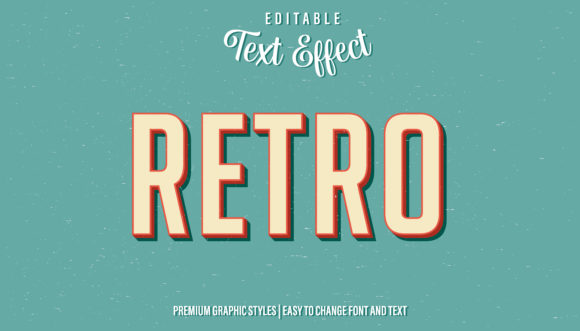
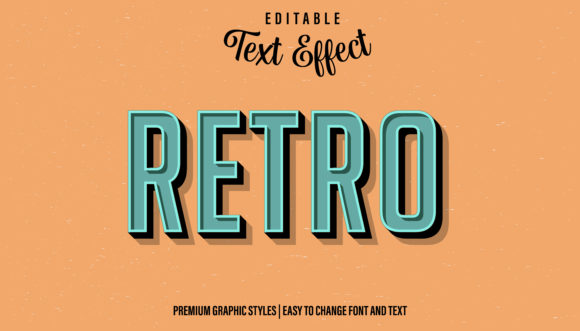
There's something magnetic about vintage design. That classic feel—the worn textures, the bold outlines, the slightly imperfect edges—carries a sense of authenticity and nostalgia that modern, sterile graphics often miss. If you've ever wanted to inject that timeless aesthetic into your own work without spending hours on complex effects, the Retro - Graphic Style for Illustrator is a game-changer. This isn't just another filter; it's a powerful, editable text effect and graphic style that can be instantly applied to logos, headlines, shapes, and lines, transforming your creations with a single click.
More Than Just a Font: A Complete Visual System
While the term "graphic style" might sound technical, think of it as a pre-packaged visual recipe. This particular style delivers a cohesive retro look that includes carefully crafted color palettes, textured overlays, and dimensional effects like bevels or shadows that mimic vintage printing techniques. The real power lies in its flexibility. Once you drag and drop the style into your Illustrator's Appearance panel, you can apply it to any vector element. This means your brand's logo, a website headline, a social media call-to-action, or even decorative lines on an invitation can all share the same authentic vintage character, ensuring immediate visual consistency across all your materials.
Practical Magic for Real-World Projects
So, where does this style truly shine? Its applications are surprisingly broad, making it a valuable asset in any designer's toolkit.
For branding and logo design, it helps establish a distinct personality. A coffee roaster, a barbershop, a craft brewery, or an indie game studio can use this style to communicate heritage, craftsmanship, and a handcrafted feel directly through their visual identity. It tells a story before a customer even reads a word.
In the realm of digital content, it's a lifesaver for social media graphics and YouTube thumbnails. A bold, retro-styled headline cuts through the noise of a busy feed, grabbing attention and conveying a specific mood—whether it's playful, gritty, or sophisticated. The same style can be applied to website banners and blog post headers, creating a memorable and engaging user experience that encourages visitors to stay and explore.
For physical products and print, the style adds tangible value. Imagine packaging design for artisanal goods, poster art for an event, or merchandise like t-shirts and stickers. The retro effect gives these items a premium, collectible quality. It’s equally effective for editorial layouts in magazines or for creating standout invitations and greeting cards that feel personal and special.
Elevating Your Design Workflow and Results
Adopting a tool like this does more than just change how something looks; it improves how you work and the impact your designs have. Here’s how:
- Professional Presentation: It instantly polishes your work, giving even beginner projects a high-end, finished appearance that builds credibility.
- Brand Recognition: A consistent, unique visual style helps your audience recognize your content instantly, whether they see it on Instagram, your website, or a printed flyer.
- Audience Engagement: Nostalgia is a powerful emotion. This style can create an instant connection with your target audience, making your message more memorable and shareable.
- Creative Efficiency: Instead of manually building complex appearance attributes, you achieve a sophisticated look in seconds, freeing up time to focus on other creative decisions.
Tips for Mastering the Retro Aesthetic
To get the most out of this graphic style, a few practical considerations will help you integrate it seamlessly into your projects.
Font Pairing is Key. While the style itself is transformative, the underlying typeface matters. Pair the styled headline with a clean, complementary sans serif font or a simple serif font for body text. This contrast ensures readability while letting the retro headline command attention. Avoid using the styled effect on long paragraphs of text.
Context is Everything. Match the style to your project's goals. A bold, distressed version might be perfect for a music festival poster, while a cleaner, more geometric retro style could suit a modern café's branding. Test it on your specific design to see if the mood aligns with your message.
Readability First. Always prioritize clarity. If the texture or effect makes your text hard to read, especially at smaller sizes, consider using the style only on larger headline elements and keeping supporting text simple.
Check Your Licensing. As with any design asset, ensure you understand the commercial licensing terms. This allows you to use the style confidently across client projects, products for sale, and marketing materials without legal worries.
Ultimately, the Retro - Graphic Style for Illustrator is more than a quick fix; it's a bridge to a rich visual language. It empowers creators—from small business owners to marketers and hobbyist crafters—to harness the enduring appeal of vintage design with modern efficiency. By applying it thoughtfully, you can create cohesive, engaging, and professionally presented visuals that resonate deeply with your audience and make your work stand out in a crowded marketplace.